Ressourcen
Wurde eine Named Resource in der Navigation selektiert, erscheinen Instanzen dieser Ressource in diesem Bereich. Er zeigt alle Scopes, Folder, Submitted Entities, Scheduling Entities bzw. Job Server an, die Instanzen dieser Named Resource anbieten.
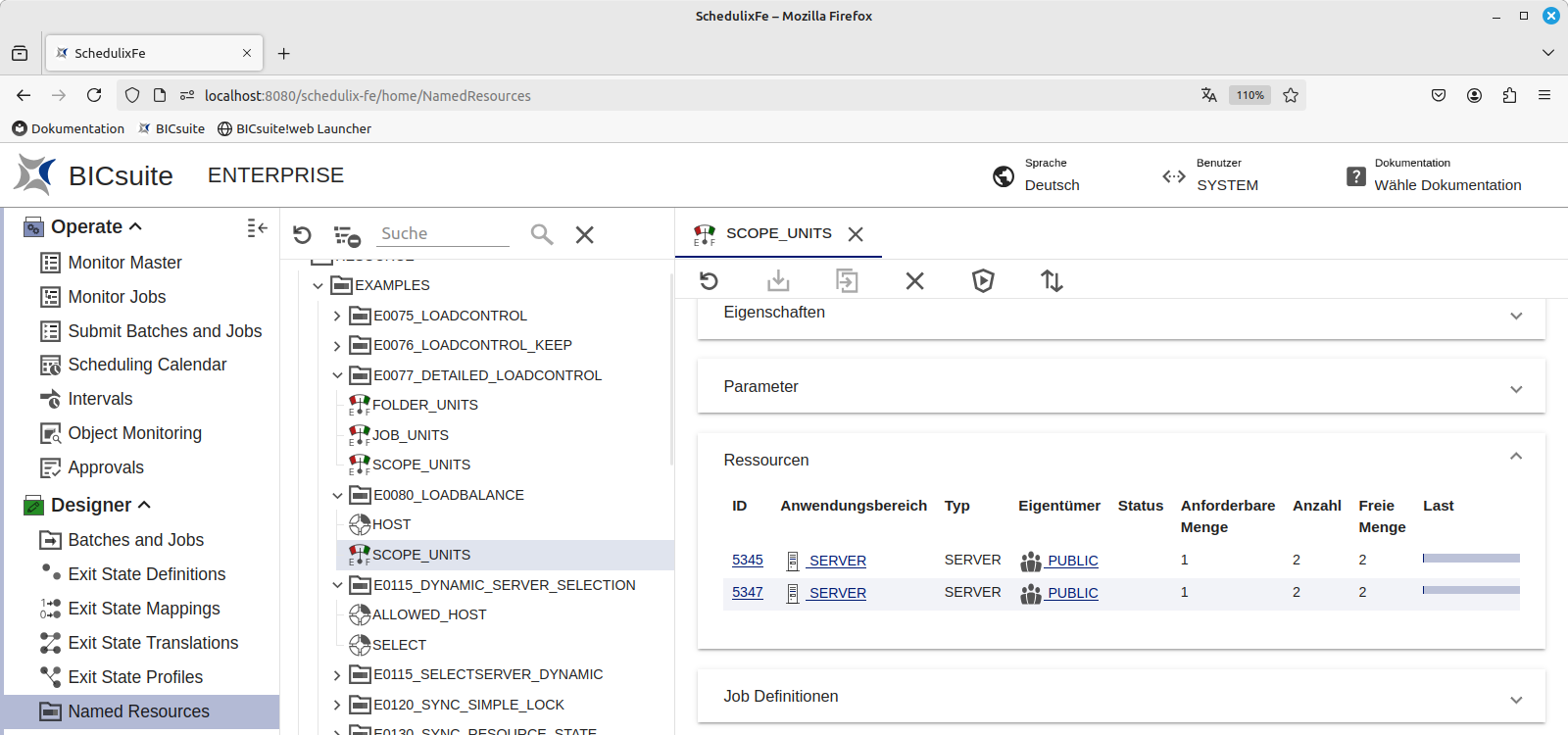
Die Spalten des Bereichs haben folgende Bedeutung:
ID
Die ID des in der jeweiligen Zeile angegebenen Anwendungsbereiches.
Anwendungsbereich
Hier erscheinen die Namen der Scopes, Submitted Entities, Scheduling Entities oder Folder, welche Instanzen (Ressourcen) der jeweilige Named Resource anbieten.
Typ
???
Eigentümer
Hier finden Sie die Gruppe, der dieser Anwendungsbereich gehört.
Status
Besitzt die gewählte Named Resource ein Resource State Profile, wird hier der aktuelle Status der Ressource angezeigt. Dies ist nur bei Synchronizing Resources möglich.
Anforderbare Menge
Die Menge der Resources, die maximal von einem Job angefordert werden darf.
Anzahl
Gibt die Anzahl der zur Verfügung stehenden Einheiten der Ressource an.
Freie Menge
Hier wird die Anzahl der freien Instanzen dieser Ressource angezeigt.
Last
Ein Balken gibt den momentanen Belegungsgrad graphisch wieder.
Online
Der Verfügbarkeitsstatus der Ressource.
Die Felder des Der Tab ”Resources” sieht aus wie folgt:
When you select a Named Resource in the navigation, its instances are displayed in the ”Resources” tab. All the scopes, folders, Submitted Entities, Scheduling Entities or jobservers that offer instances of this Named Resource are shown here.
The instantiations of the Named Resource are described by the following fields:
ID
The ID contains a system-wide unique number.
Scope
The names of the scopes, Submitted Entities, Scheduling Entities or fold- ers that offer instances (resources) of the respective Named Resource are shown here.
Type
One of four types can be assigned to each Named Resource:
-
SCOPE
The name of the scope that is definied in Job Server and Resources. -
SERVER
The name of the job server that is defined in Job Server and Resources. -
FOLDER
The name of the folder in which the resource is defined. -
JOB
The name of the job in which the resource is defined. If there is no bracket with a number after the name, it is a Defined Resource of the job. If there is a parenthesis with a number after the name, it is the instance of the Defined Resource of the job whose job ID is in the parenthesis.
Owner
The name of the group that owns the Named Resource.
State
If the selected Named Resource has a Resource State Profile, the current state of the resource is displayed here. This is only possible with Synchronizing Resources.
Requestable Amount
The maximum amount of resources that can be requested by a job.
Free Amount
The number of free instances of this resource is shown here. A bar graphically indicates the current allocation rate.
Amount
The amount is the number of available units of the resource.
Online
The availability status of the resource.